
本文目前僅提供英文版本。
Ask a contractor whether their documents are ready for AI and the answer is usually an apology. The drawings are spread across a file server, a document management system and a few laptops. Half the older jobs are scans. The as-builts are in a trailer, a flat file drawer, or nowhere.
The usual next step is a proposal for a data project: clean the archive, standardize the folders, rename everything, then start. Many of those projects stall, because the archive keeps growing while they run and the people who understand the old jobs are busy bidding new ones. Being ready for AI has little to do with tidiness. It has to do with a short list of habits about how your documents relate to each other.
You do not need to clean everything first
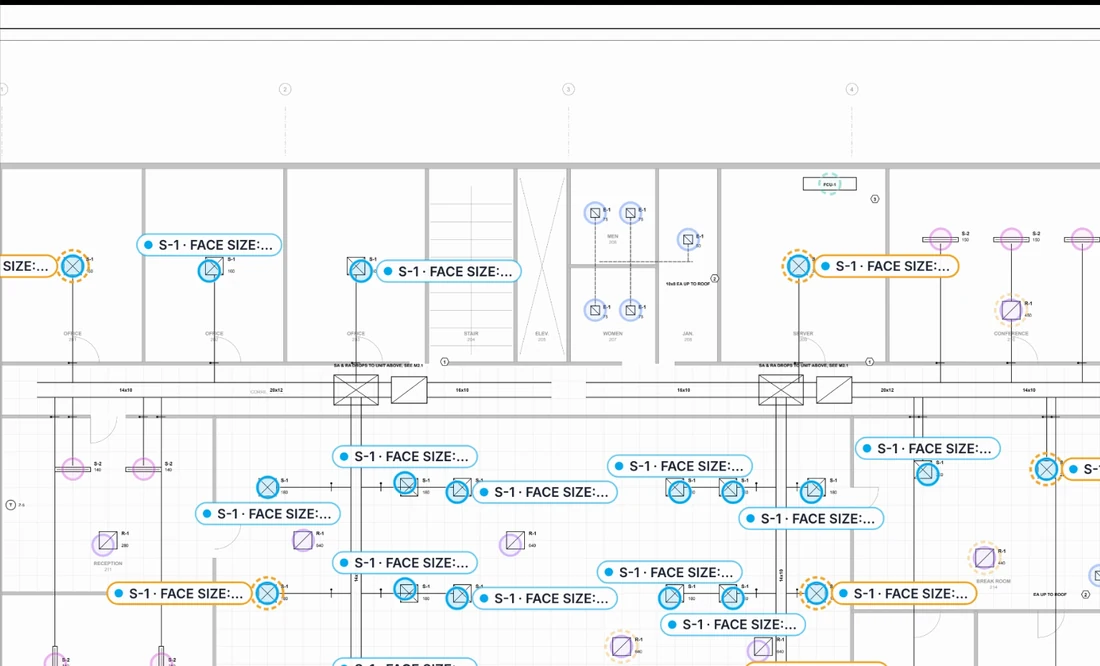
Reading messy documents is the AI's job. A model built for construction drawings should handle scanned sheets, rotated pages, mixed CAD exports, handwritten markups and a title block that changed format halfway through a project. If a file is named scan0047.pdf, it reads the title block instead.
What a model cannot do is recover context that was never recorded. It cannot know which of three versions of the Level 2 plan your estimate was priced from, unless someone kept that set together. It cannot know that an RFI response changed a damper schedule, unless the response was filed with the job. Those are not file-hygiene problems. They are provenance problems, and they are much smaller.
A model can read a messy sheet. It cannot guess which messy sheet you built from.
What actually matters
Four habits make most of the difference.
Sheet indexes and revision history
Every issued set should carry a sheet index. Keep it as issued, and keep the issuer's sheet numbers rather than renaming files to an internal scheme. With a consistent index, an AI layer can confirm that a set is complete, notice a sheet that appeared or disappeared between issues, and tell a superseded sheet from its replacement.
Then keep the superseded sheets. Do not overwrite the old plan when the new one arrives. The difference between two revisions is where scope changes live, and once the old revision is gone, nobody can show what changed, including you, across the table in a change order negotiation.
Which set was bid, and which was built
This is the most valuable context in a contractor's archive, and the easiest to lose. For every job, you should be able to point to three sets:
- The bid set. The drawings and specifications the estimate was priced from, with every addendum, as issued.
- The construction set. The conformed or issued-for-construction documents the contract was signed against, plus the revisions, bulletins and supplemental instructions that followed.
- The record set. The as-builts or record drawings that show what was actually installed.
The gap between the bid set and the construction set is where contract value moves. The gap between the construction set and the record set is what your service team, and your next estimate on the same building, will need to know.
RFIs and change orders tied to drawings
An RFI asks about a specific sheet and detail. The answer comes back as a sketch, a supplemental instruction, a bulletin or a revised sheet. A change order request cites the document that triggered it. If your RFI and change logs carry sheet references, even as plain text, an AI layer can tie each question and change to the region of the drawing it concerns, and check whether a later revision picked it up. Without references, the link lives in a project manager's memory.
Close-out with as-builts
Many archives stop at the construction set plus whatever was marked up in the field. If the redlines are scanned and filed with the job at close-out, they become the most useful record you hold for that building: for service calls, for renovation bids, and for estimating the next job of the same type. This is a close-out habit, not a technology problem.
A checklist by document type
Not every document does the same work. The table lists the common ones, what an AI layer can do with each, and the habit that helps most.
| Document | What an AI layer can do with it | What helps most |
|---|---|---|
| Bid drawing sets | Take off counts and lengths, classify sheets, review scope across disciplines | The full set as issued, with its sheet index |
| Addenda and bulletins | Find what changed against the prior issue, and rerun only the affected quantities | Dated, numbered and kept with the set they modify |
| Equipment schedules | Extract a structured equipment list and reconcile its tags against the plans | Kept with the drawing set they belong to |
| Specifications | Find the requirements that drive cost, such as pressure classes, insulation, testing and commissioning, and check them against the plans | The project manual as issued, with its addenda |
| Submittals and shop drawings | Compare what was submitted with what was scheduled, and track approval status | Filed by spec section, with the reviewer's stamp |
| RFIs and responses | Link each question and answer to its sheet region, and flag answers that change scope | A log that cites sheet and detail numbers |
| Change orders | Connect each change to the drawings and RFIs behind it, and surface changes that were never priced | A change log that names the trigger document |
| As-builts and redlines | Provide the baseline for service work, renovations and future bids on the same building | Scanned at close-out and filed with the job |
| Past estimates and job cost reports | Compare bid quantities with installed quantities across similar jobs | Each estimate stored with the set it priced |
What matters less than you think
- File names and folder structures. Title blocks carry the sheet number, title and revision, and a model reads them directly. Time spent on the perfect folder taxonomy is better spent keeping sets together.
- Scans versus vector PDFs. Vector files read more cleanly, but a legible scan is workable. A useful test: if a person can read it on screen, it is usually fine. If a person has to squint, so will the model.
- Migrating systems. You do not need to move the archive into a new system before starting. Documents can come in job by job from wherever they live today.
- Backfilling everything. Years of past jobs do not need processing before the first useful result. Most of the value sits in live work and in the few past jobs that resemble what you are bidding next.
A sequence that is not a data project
The order matters more than the scope. Start where the value shows up in days, and let the archive build itself as a by-product of live work.
- Start with one live bid. Bring in the bid set and addenda as issued. Run take-off and scope review on real work with a real deadline, and judge the result against your own estimators' counts.
- Keep the bid record together. The set, the addenda, the verified take-off and the submitted estimate, stored as one package. This is the seed of your historical record.
- Carry the set forward on award. When the conformed or construction set arrives, compare it against the bid set. The differences are your first list of potential change orders.
- Add one habit to RFIs and change requests. Every one cites the sheet and detail it concerns.
- Close out with as-builts. Scan the redlines, file the record set with the job, and keep the final take-off next to it.
- Backfill selectively. Bring in the past jobs that look most like the work you are chasing, the buildings you service, and the customers who give you repeat work.
Each step is a small change to how a job is run, and each one is useful on the job where it happens. Our deployments go live in three weeks, and an archive cleanup is not a prerequisite.
Security questions worth asking first
Ready also means knowing where your documents go. Your drawing sets carry your customers' confidential information, and your estimates carry your own. Before you put either into any AI system, ask:
- Will the vendor train models on your documents? We do not train AI models on customer content.
- Where does the data live, and is it isolated? Each Operon customer runs in an isolated tenant in the cloud, or on-premise.
- Is it encrypted? It should be, in transit and at rest. Ours is.
- Who can see and change what? Role-based access control should decide that, not a shared folder permission.
- Can you see who verified what? We keep an audit log of every verification and change.
Ready is a set of habits
AI-ready is not a state an archive reaches after a cleanup. It is a short list of habits: keep the set you bid, keep every revision, tie RFIs and changes to the sheets they concern, and close out with as-builts. Start with the next bid, and the archive becomes more useful with every job you run.
For what a verified take-off does with a bid set, read Bid on counts, not allowances. For what happens to those sets after award, read Revision control from IFD to as-built. For your trade, see our construction and HVAC pages.